
Compra Step Sixteen PC

Dove comprare la chiave Steam Step Sixteen {6} più economica? Confronta i prezzi da 1 store e scegli la soluzione migliore tra 1 offerte su XD.deals. Al momento il prezzo {6} più basso per Step Sixteen nei keyshop è su 4,99 € (0% di sconto).

Uscita: 31 mag 2023
Steam:
Overwhelmingly Negative (3)
Keyshops
Non disponibile
Compra nello store ufficiale:
4,99 €
Compra nei keyshop:
Vedi storico prezzi

Store ufficiali (1)

DRM:
Steam
Steam
Steam
Step Sixteen
Windows
2sett fa
DRM:
Steam
Steam
4,99 €

Info su Step Sixteen

Step Sixteen - info sul gioco
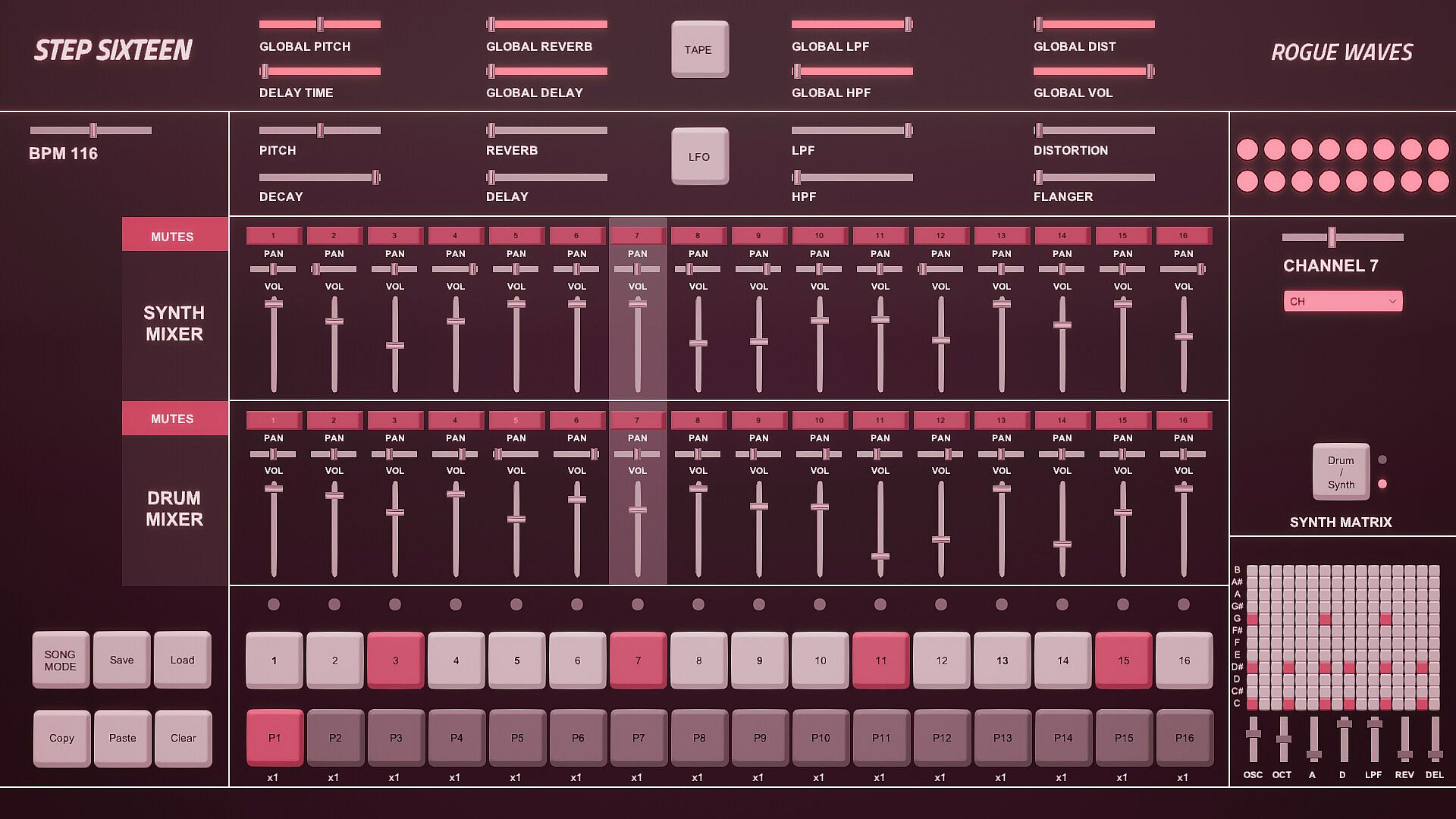
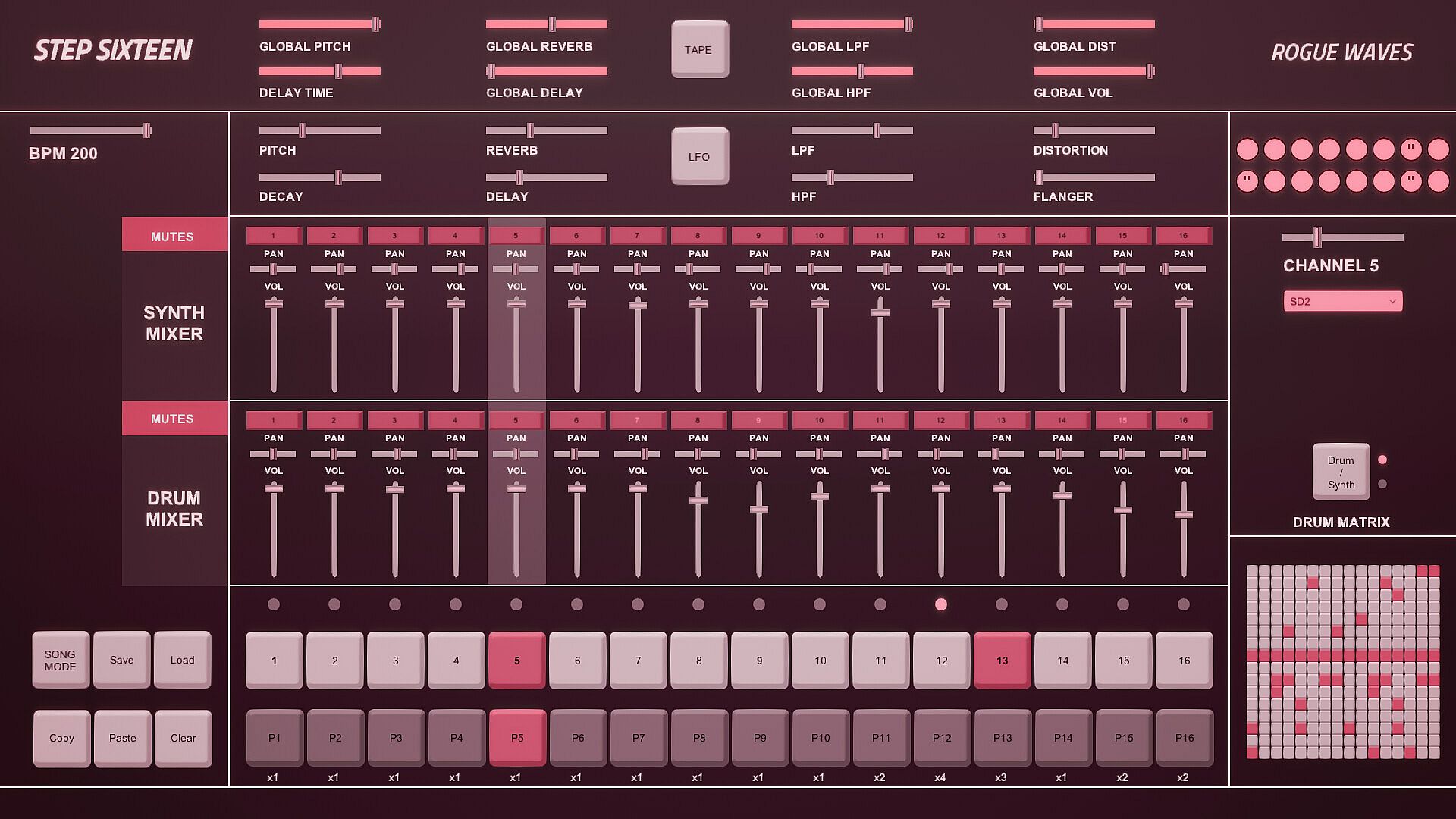
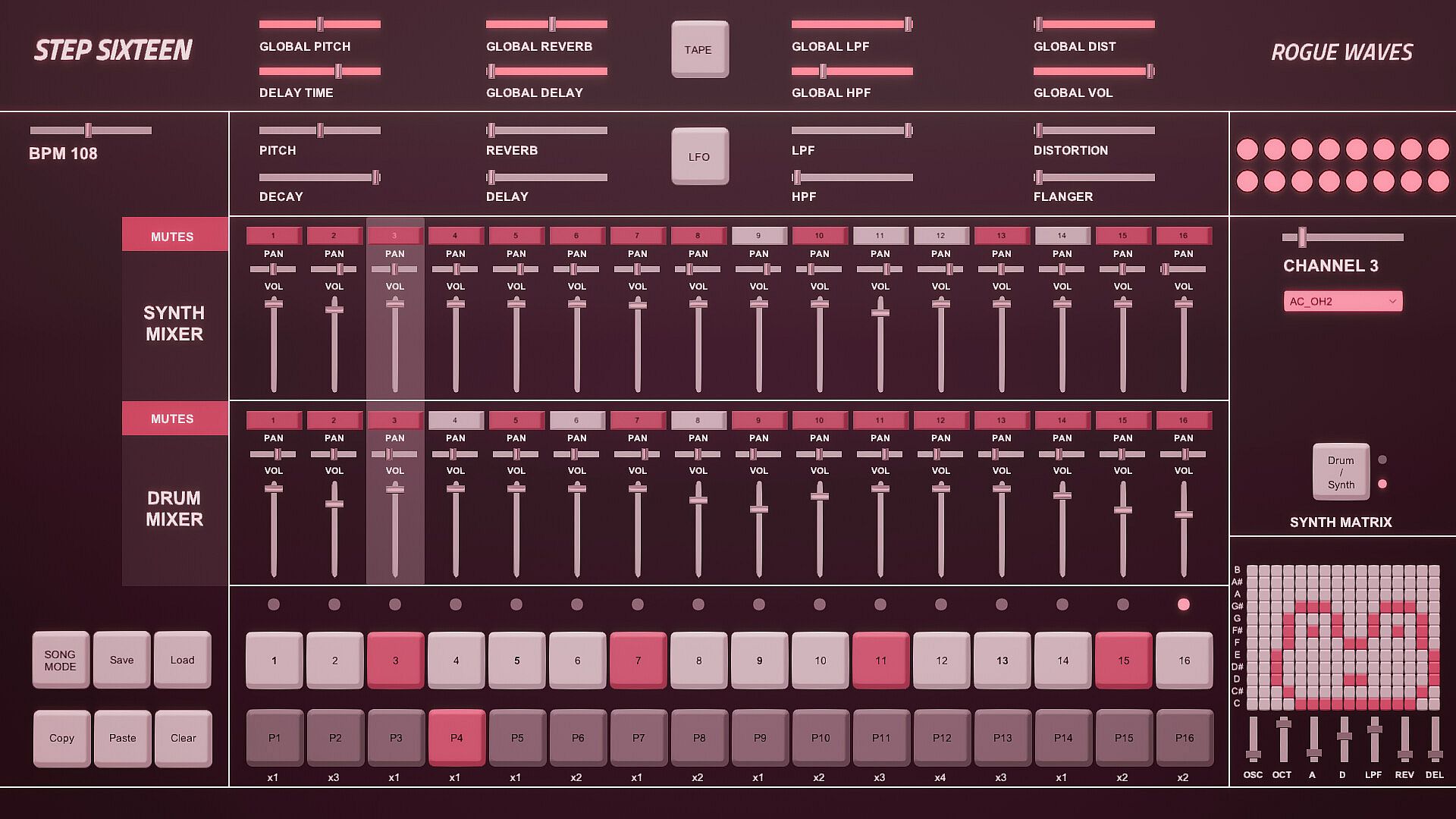
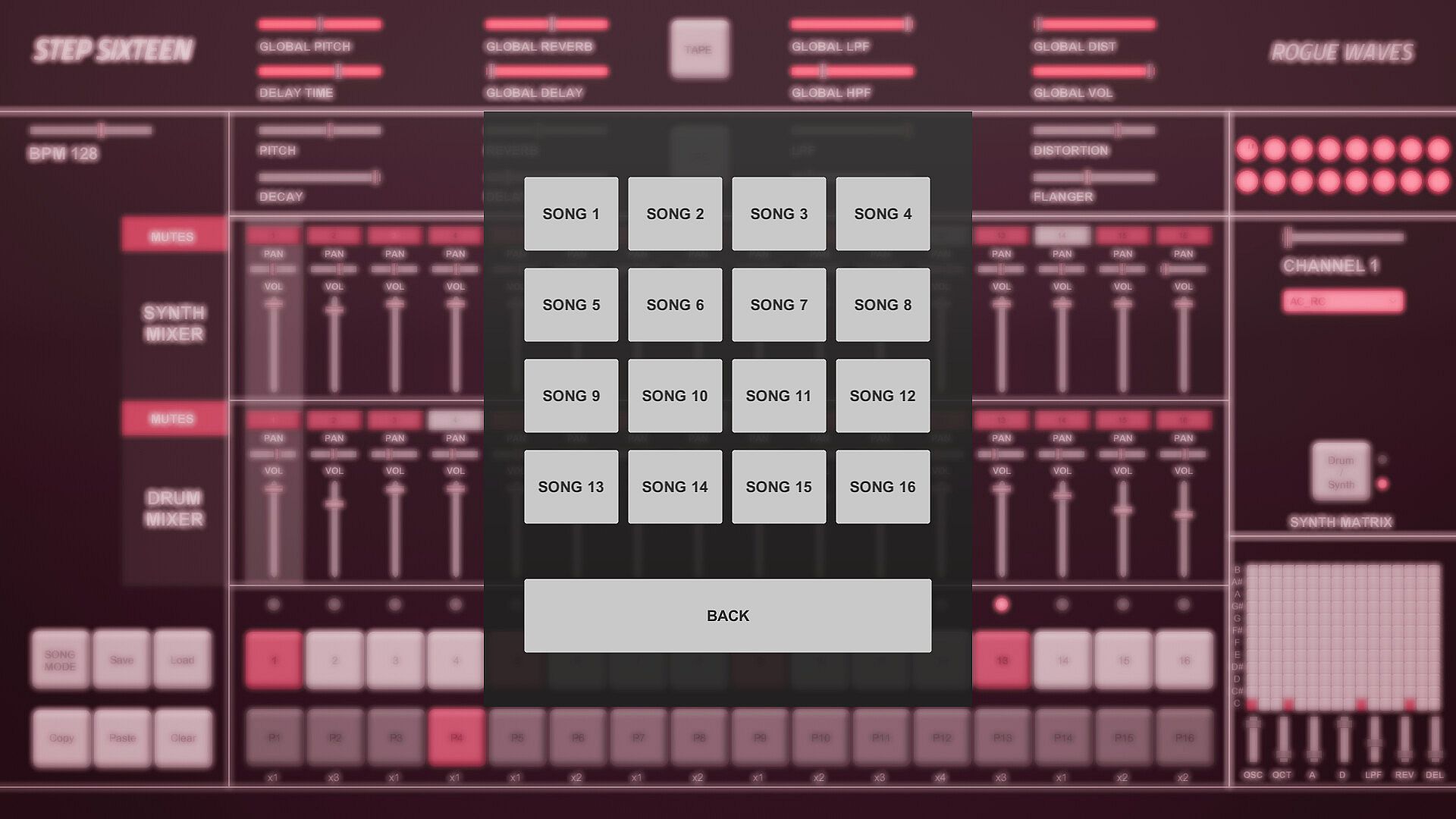
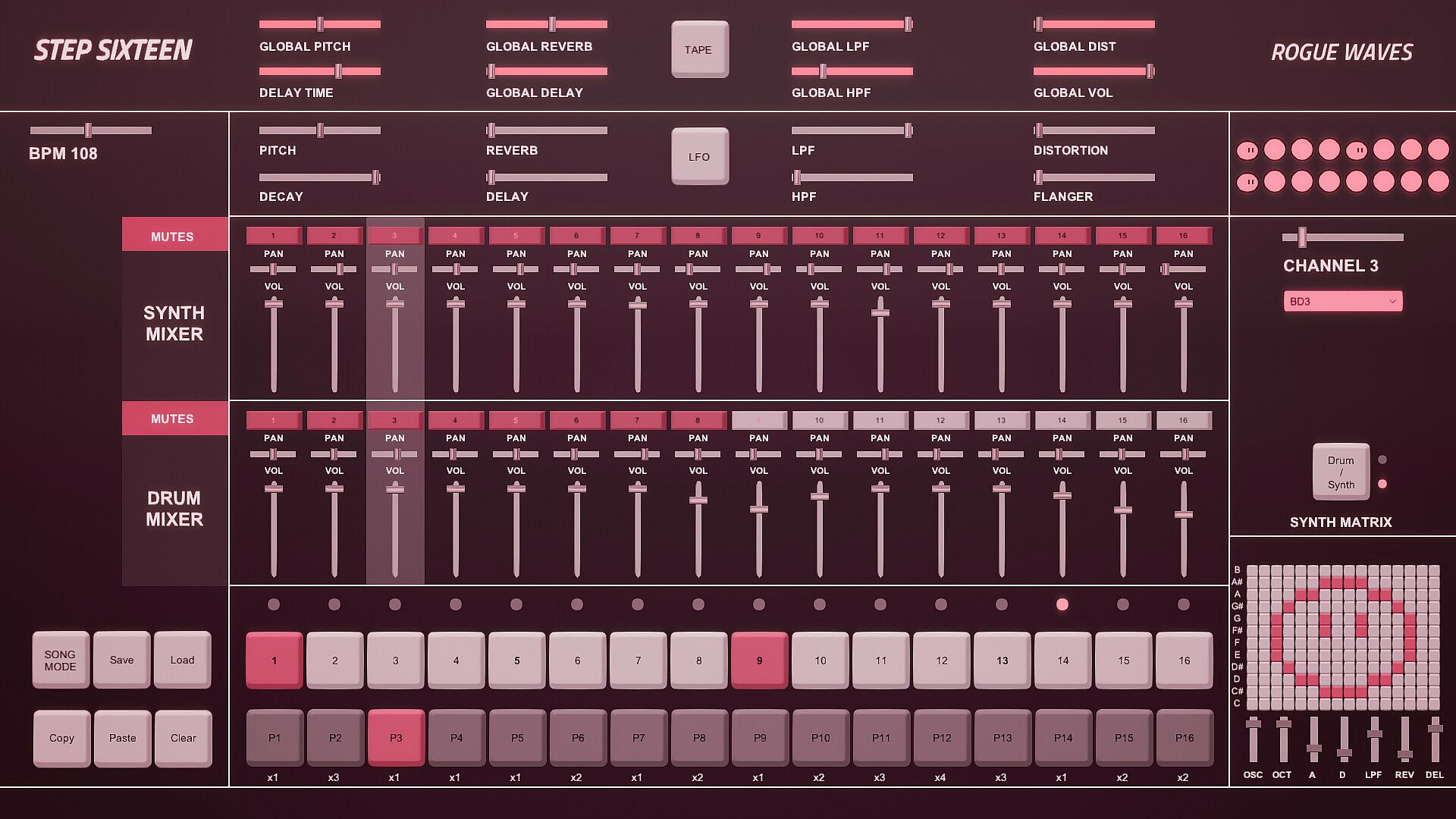
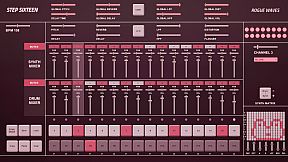
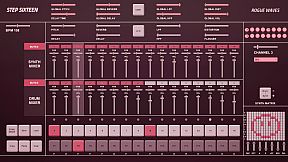
Step Sixteen delivers everything needed to craft electronic music beats, melodies, and full songs on PC. Fire up drum channels for rhythms or switch to the synth matrix for bass lines, arpeggios, chords, and more. Chain patterns in Song Mode, tweak repeats, and sequence them with simple mouse clicks on step buttons, sliders, and patch menus featuring 27 electronic and acoustic percussive sounds. Global sliders adjust pitch, delay, reverb, filters, distortion, and volume across all 16 channels, while per-channel controls add decay and flanger. FX buttons trigger tape stops or LFO pitch randomization, and mixers handle mutes, pan, and levels for drums and synths separately. Drum dancers visualize rhythms as the BPM slider sets the pace-perfect for indie audio production enthusiasts eager to build tracks fast with keyboard shortcuts like spacebar play and pattern copy-paste.

All you need to get started making electronic music - with Step Sixteen you can create your own beats, melodies or songs in no time. Use the drum channels to create wild rhythms or the synth matrix to create bass lines, arpeggios, chords or melodies.

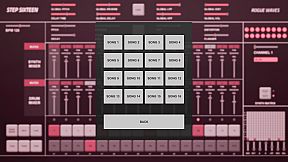
Chain patterns together and sequence them in Song Mode to create full songs.

Keyboard Controls

Press Spacebar to start or stop the sequencer.
Press Enter to Access the Main Menu.
Mouse Controls

Use the mouse to click buttons, patch dropdown menus, pattern repeat numbers and to change slider values. [NOTE: Click read more below for more details]


1. Step Indicator LEDs [1-16]
Displays the current step of the sequence when the sequencer is running. Press spacebar to start the sequencer.
[Note] Clicking a step indicator will copy its step button value, click another step indicator to paste the step.
2. Step Buttons [1- 16]
These are used to trigger the drum sounds. Click to turn a step on/off. Each channel has its own 16 step buttons.
3. Pattern Buttons [1-16]
These are used to select a pattern. When in Song Mode patterns will be played back in order.
[Note] In Song Mode pattern changes are quantised to occur at the end of the bar.
4. User Buttons.
The Song Mode Button enables patterns to be played back sequentially.
The Save Button allows the user to save changes to the current song
The Load button allows the user to load what was saved.
The Copy Button allows the user to copy the currently selected pattern
The Paste Button enables the user to paste a copied pattern to another pattern.
The Clear Button clears the currently selected pattern.
[Note] Saving also automatically occurs when the program is closed.
5. Pattern Repeats.
When in Song Mode these determine how many times a pattern will repeat before progressing to the next pattern.
Repeat can be set to x1 (plays once), x2, x3 or x4.
Click on a repeat number to increment its value.
6. Matrix Section.
If the current matrix is set to Drum Matrix the user can input steps across all drum channels without having to change channels.
Channels are displayed on the vertical axis while steps are represented on the horizontal axis.
If the current matrix is set to Synth Matrix the user can input steps on the currently selected synth channels.
Notes/pitch are displayed on the vertical axis while steps are represented on the horizontal axis.
7. Matrix Switch.
Toggles between the Drum and Synth Matrix. An LED is also used to indicate which matrix is displayed.

8. Patch Drop Down Menu.
Click this menu to select the sound/patch for the currently selected Channel.
There are 27 sounds to choose from spanning a variety of electronic and acoustic percussive sounds.
[Note] The same sound/patch can be loaded on multiple channels.

9. Channel Selection Slider.
Use this slider to select the active channel.
The active channel is displayed in the text below and is also highlighted in the mixer section.
There are 16 channels to choose from.
10. Drum Dancers [1-16].
Each drum channel has a dancer that will dance according to the rhythm programmed on that channel.
11. FX Buttons.
The Tape FX Button performs a classic tape stop effect. toggle it off to resume playback.
The LFO FX Button randomises the pitch of all steps.
12. Global Sliders.
These parameters are applied across all channels.
There are global controls for Pitch, Delay Time, Reverb, Delay, LPF (Low Pass Filter), HPF (High Pass Filter), Distortion and Volume.
13. BPM Slider.
Used to set the BPM (beats per minute). This determines how fast/slow the sequencer plays back.
14. Channel Sliders.
These parameters are used to shape the current channel's sound.
There are controls for Pitch, Decay, Reverb, Delay, LPF (Low Pass Filter), HPF (High Pass Filter), Distortion and Flanger.
15. Synth Mixer Mutes [1-16].
These are used to mute/unmute synth channels 1-16.
Each mute button’s channel number will be lit when a sound is triggered on its channel.

16. Synth Mixer Pan.
Used to set the speaker panning for synth channels 1-16.
17. Synth Mixer Volume.
Used to set the volume level for synth channels 1-16.
18. Drum Mixer Mutes [1-16].
These are used to mute/unmute drum channels 1-16.
Each mute button’s channel number will be lit when a sound is triggered on its channel.

19. Drum Mixer Pan.
Used to set the speaker panning for drum channels 1-16.
20. Drum Mixer Volume.
Used to set the volume level for drum channels 1-16.
Interfaccia:
English

Classificazione per età

Non disponibile
Steam:
Overwhelmingly Negative (3)

Minimo:

  • Sistema operativo: Windows 10
  • Processore: 2.9 GHz Quad-Core Intel Core i5
  • Memoria: 8 GB RAM
  • Grafica: NVIDIA GeForce GTX 660M 512 MB
  • Archiviazione: 153 MB available space

Consigliato:

Minimo storico
Storico prezzi dei negozi ufficiali
-
-
-
Storico prezzi dei keyshop
-
-
-

FAQ

8 domande

Prima di cercare una chiave economica di Step Sixteen, controlla le informazioni essenziali. Sviluppato da Rogue Waves. Pubblicato da Rogue Waves. Data di uscita su PC: 31 mag 2023. Generi: Indie, Audio Production.

Q

Dove comprare una chiave Steam di Step Sixteen a poco?

Grazie al nostro comparatore di prezzi e ai codici sconto verificati, puoi acquistare una chiave di Step Sixteen a partire da 4,99 €. Questa offerta è disponibile su Steam ed è tra le più economiche sul mercato. Tutte le chiavi su XD.deals vengono consegnate in formato digitale e sono disponibili per il download immediato dopo il pagamento. I prezzi includono già le commissioni e i codici promozionali applicati, così vedi sempre il prezzo più basso di Step Sixteen su PC. Controlla lo storico prezzi di Step Sixteen per acquistare al momento migliore.

Secondo il nostro ultimo aggiornamento (aggiorniamo i prezzi Steam più volte al giorno), il prezzo di Step Sixteen su Steam è 4,99 €. Puoi risparmiare un ulteriore ~6% pagando con una carta regalo Steam scontata.

Il nostro tracker dei prezzi copre sia i rivenditori ufficiali che i marketplace di chiavi, così puoi trovare Step Sixteen in offerta anche al di fuori delle promozioni stagionali. Al momento rileviamo 1 offerta attiva da store ufficiali e keyshop. Controlla la tabella qui sopra, confronta con il minimo storico e imposta un avviso per non perdere il prossimo calo di prezzo.

Secondo i nostri dati, Step Sixteen non è attualmente disponibile su GeForce NOW. Dovrai eseguirlo localmente sul tuo PC. Sfoglia i giochi disponibili su GeForce NOW.

. Step Sixteen ha una pagina ufficiale su Steam. Puoi anche acquistare una chiave Steam di Step Sixteen da venditori terzi. Il nostro comparatore include attualmente 1 offerta con DRM Steam. Scegline una per assicurarti che il download di Step Sixteen avvenga sulla piattaforma di Valve.

Non al momento. Valve classifica Step Sixteen come non supportato su Steam Deck. Tieni d'occhio XD.deals - tracciamo gli aggiornamenti di Proton e le soluzioni della community. Sfoglia i giochi Steam Deck Verified o Steam Deck Playable.

Step Sixteen non sembra essere disponibile su PC Game Pass, EA Play, Ubisoft+ o altri servizi in abbonamento per PC al momento. L'unica opzione è acquistare il gioco - usa XD.deals per trovare il prezzo migliore.

No - XD.deals non è un negozio. Siamo un comparatore di prezzi che traccia le migliori offerte per Step Sixteen tra store ufficiali e keyshop verificati. Clicca "Vai al negozio" accanto a qualsiasi offerta e verrai reindirizzato al sito del rivenditore per completare l'acquisto.

Migliori prezzi per Step Sixteen

1 Steam Steam Official
4,99 €

Vuoi comprare al momento migliore? Imposta un avviso di prezzo su XD.deals e ricevi una notifica quando Step Sixteen raggiunge il suo prossimo minimo storico.

Crea avviso
Unisciti al nostro Discord
Ottieni aiuto immediato dalla community e resta aggiornato sulle offerte
Imposta avvisi di prezzo
Ricevi notifiche via email quando i prezzi scendono al tuo target
Crea un account gratuito
Sblocca wishlist, avvisi di prezzo e sincronizzazione Steam