

SONAR - Celemony Melodyne 4 Essential Demo serves as an audio production platform on PC that combines full-featured digital audio workstation capabilities with integrated pitch and timing correction tools. Aspiring musicians, content creators, and game sound designers use it to build, edit, and finalize tracks through a streamlined interface that supports extensive recording and arrangement workflows.
Gameplay
The core experience centers on multi-track recording and arrangement. Users capture audio and MIDI performances across unlimited simultaneous tracks while maintaining high-resolution processing up to 384 kHz sample rates and 64-bit depth. The 64-bit internal mix engine ensures clean signal handling throughout the session.
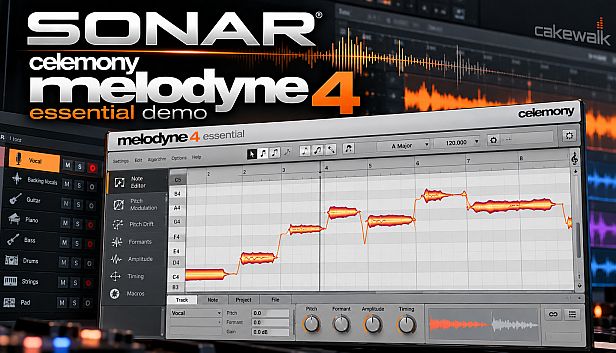
Editing begins with direct manipulation of audio regions. Melodyne integration allows precise adjustments to pitch, timing, and note separation on individual clips or entire mixes using the Universal algorithm. This approach preserves natural sound quality while correcting intonation issues or tightening rhythmic elements without introducing artifacts.
Virtual instruments and effects expand creative options through VST3 and VST2 support. The step sequencer and Matrix View facilitate pattern-based composition and real-time triggering of loops or phrases. Groove Clip functionality automatically follows project tempo and pitch changes, keeping layered elements aligned during arrangement shifts.
Mixing relies on flexible routing with unlimited sends and buses. ProChannel modules and additional effects chains shape individual tracks and the overall balance. Export options cover common formats including WAV, AIFF, FLAC, MP3, and video imports for synchronized scoring work.
Game Modes
Production occurs primarily through the main track view, which displays audio, MIDI, and instrument lanes side by side for comprehensive oversight. The piano roll view handles detailed MIDI editing with note-level precision and articulation support.
Step sequencer mode focuses on beat and pattern creation, allowing step-by-step input with controls for swing, probability, and flam. Matrix View provides a grid-based launcher for triggering clips and building arrangements on the fly during live performance or composition sessions.
Additional workflow modes include dedicated mixing and mastering templates that load pre-configured routing and effects setups. Project tutorials guide new users through standard recording, editing, and export procedures while maintaining access to all core tools.
Supported Formats and Integration
The platform handles a wide range of audio file types for import and export, including time-stamped Broadcast Wave, AIFF, FLAC, OGG, and various DSD formats. Video files such as AVI, QuickTime, and MPEG import directly for alignment with visual content.
ARA support enables tight integration between the host environment and Melodyne, allowing edits to appear as region effects within the timeline. ReWire compatibility extends connectivity to other applications, while SoundCloud integration streamlines sharing of finished mixes.
Multi-touch support on compatible Windows systems enhances navigation and parameter adjustment during extended sessions. Bit Bridge technology ensures legacy 32-bit plug-ins function within the modern 64-bit mixing environment.
Is It Worth Playing?
This audio production tool targets users who need reliable multi-track recording, detailed editing, and professional mixing features without unnecessary complexity. The inclusion of Melodyne 4 Essential provides immediate access to high-quality pitch and timing correction that integrates directly into the workflow.
Season pass holders from 2017 received ongoing updates through the end of that year and retained perpetual access to the core application. Continued development has carried forward key elements such as unlimited tracks, VST3 support, and the 64-bit engine into current versions of the software.
Players focused on vocal production, instrumental arrangement, or game audio design find the combination of editing depth and template-driven mixing particularly practical. The demo version of Melodyne allows testing of essential correction tools before committing to fuller feature sets.
- Unlimited audio and MIDI tracks with high-resolution engine
- Direct Melodyne integration for pitch and timing edits
- Step sequencer and Matrix View for pattern work
- Extensive format support and export options